
Slideshow Items

  • Mobility Accessories
  • mobility/mobility-accessories
  • Mobility
  • mobility
ARGO-Airgo

  |  

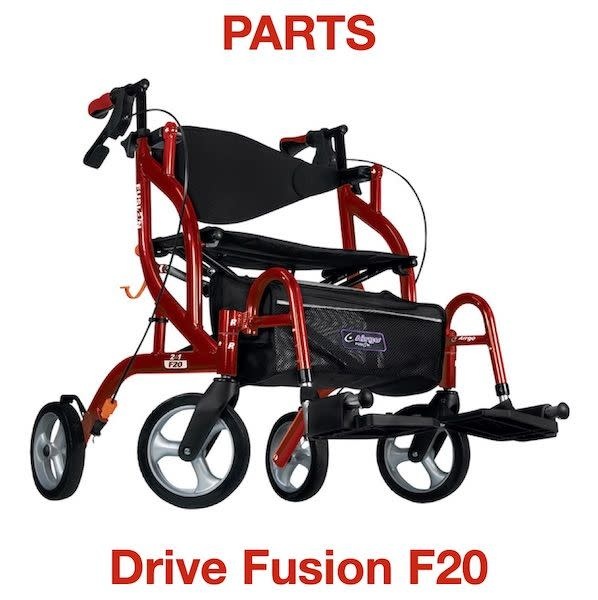
Backrest hardware kit for Airgo rollator/transport chair models like Fusion and Excursion

C$22.00
Out of stock online
In store: Check availability

Available in store

SKU: B01‑861

The M6×16 mm bolt and hex lock-nut hardware set with OEM Part B01-861 specification delivers secure backrest mounting for AirGo Fusion F20/F23 and Excursion X18/X20 models while maintaining proper folding geometry and structural stability.

    • Why OEM-Specification Backrest Hardware?

      OEM-specification backrest mounting hardware represents a critical but often overlooked component in rollator and transport chair safety systems, as the backrest serves multiple essential functions beyond simple postural support. The backrest provides trunk stabilization during seated rest periods, prevents posterior falls when users lean backward, creates a visual and tactile reference for proper seating position, and maintains the structural integrity of the side-folding frame geometry. When backrest mounting hardware fails, loosens, or corrodes, the entire seating system becomes compromised, creating a cascade of safety hazards including unstable trunk support, asymmetric weight distribution, frame misalignment affecting folding mechanisms, and potential catastrophic backrest detachment during use. Generic hardware from local hardware stores presents multiple failure points: incorrect thread pitch preventing proper engagement, insufficient bolt length leaving inadequate clamping force, incompatible materials causing galvanic corrosion, wrong head configurations interfering with folding mechanisms, and improper tensile strength ratings leading to mechanical failure under load. The B01-861 kit uses precisely-specified M6×16mm bolts with aerospace-grade thread tolerance, heat-treated steel construction rated for dynamic loading cycles, corrosion-resistant plating compatible with aluminum and steel frame materials, hex lock-nuts featuring nylon inserts that prevent loosening under vibration, and dimensional specifications ensuring proper clearance during side-folding operations. This OEM specification guarantees that replacement hardware matches the original equipment in every critical dimension, maintaining the engineering tolerances established during initial product design and testing. For AirGo Fusion and Excursion series rollators, which feature sophisticated side-folding mechanisms with multiple pivot points, maintaining precise hardware specifications ensures that folding geometry remains correct, preventing frame binding, excessive wear on pivot bushings, and misalignment that could cause premature mechanical failure.

      Key Features

      • M6×16mm Thread Specification: Metric coarse thread pitch provides optimal engagement in aluminum and steel frame materials with proper clamping force
      • Hex Lock-Nut Design: Nylon insert prevents loosening under vibration and dynamic loading common in rollator use environments
      • OEM Part Number B01-861: Factory-specified component ensures exact dimensional match to original equipment specifications
      • Complete Hardware Set: Includes 2 bolts + 2 lock-nuts (one pair for left/right backrest mounting points) in single package
      • AirGo Fusion Compatibility: Direct fit for F20 and F23 side-folding rollator/transport chair models
      • AirGo Excursion Compatibility: Direct fit for X18 and X20 side-folding rollator series
      • Corrosion-Resistant Finish: Protective plating extends hardware service life in humid or outdoor storage conditions
      • Proper Length Specification: 16mm length provides adequate thread engagement without excessive protrusion that could interfere with folding

      Benefits

      • Restored Backrest Stability: Secure mounting eliminates dangerous backrest wobble or looseness that compromises trunk support safety
      • Maintained Folding Functionality: OEM-specification hardware preserves precise frame geometry required for smooth side-folding operation
      • Prevention of Frame Damage: Proper hardware fit prevents oversized holes, stripped threads, or frame cracking from incorrect fastener use
      • Extended Equipment Life: Timely hardware replacement prevents progressive damage to mounting points that would necessitate costly frame replacement
      • User Safety Assurance: Factory-specification components maintain manufacturer's intended safety margins and structural integrity
      • Cost-Effective Maintenance: $5-15 hardware kit prevents $200-400 frame replacement or $150-300 complete rollator replacement
      • Professional Installation Compatibility: Standard metric sizing enables proper installation by home health technicians or family caregivers with basic tools
      • Regulatory Compliance: OEM parts maintain equipment compliance with original safety certifications and standards
      • Insurance Coverage Preservation: Use of manufacturer-specified replacement parts maintains warranty and liability coverage validity

      Clinical Applications

      ✓ Routine maintenance replacement for aging rollators (3-5 year equipment lifecycle)
      ✓ Corrosion-related hardware failure in humid climates or outdoor storage environments
      ✓ Lost or damaged hardware during transport, storage, or cleaning procedures
      ✓ Vibration-loosened fasteners from daily use over multiple years
      ✓ Emergency repair for institutional equipment fleets (nursing homes, hospitals)
      ✓ Refurbishment of used/donated rollators for community equipment loan programs
      ✓ Preventive maintenance in high-use environments (rehabilitation facilities)
      ✓ Frame reassembly after cleaning or deep maintenance procedures
      ✓ Correction of improper repairs using non-specification hardware
      ✓ Equipment preparation for resale or patient transfer
      ✓ Home health agency equipment maintenance programs
      ✓ DME supplier repair and refurbishment operations
      ✓ Warranty repair by authorized service centers
      ✓ Safety recall compliance requiring hardware replacement
      ✓ Quality assurance programs requiring periodic hardware inspection and replacement

      Usage & Application

      Pre-Installation Inspection and Preparation: Before beginning hardware replacement, conduct a comprehensive assessment of the backrest mounting points and surrounding frame structure. Inspect frame tubing at mounting locations for cracks, elongated holes, bent metal, or other damage that would prevent secure hardware attachment. If frame damage is evident, hardware replacement alone will not restore safe function, and frame repair or replacement becomes necessary. Examine the backrest frame tubes and mounting brackets for integrity, looking for cracks, bends, or worn bushings. Clean mounting areas thoroughly with isopropyl alcohol or mild degreaser to remove accumulated dirt, oxidation, or previous thread-locking compound that could prevent proper hardware seating. Verify that you have the correct hardware kit (B01-861) by confirming the M6×16mm specification marking on the bolt head or packaging. Gather necessary tools: 10mm wrench or socket for hex nuts, 5mm hex key or appropriate driver for bolt heads (head style varies by production batch), clean cloth, and optional thread-locking compound if recommended by the service manual.

      Removal of Existing Hardware: If replacing worn or damaged hardware, removal must be performed carefully to avoid damaging frame threads or mounting holes. Position the rollator on a stable work surface with adequate lighting. If the folding mechanism is engaged, unfold the rollator fully to access backrest mounting points. Locate the two backrest mounting bolts, one on each side of the frame where the backrest tubing connects to the main side frame. Hold the hex nut on one side with a wrench while turning the bolt head from the opposite side using the appropriate hex key or wrench. If hardware is corroded or seized, apply penetrating oil and allow 10-15 minutes for penetration before attempting removal. Avoid excessive force that could strip threads or round off bolt heads. If a bolt is completely seized, carefully drill out the bolt head using a drill bit slightly smaller than the bolt shaft diameter, taking extreme care not to enlarge the frame mounting hole. Once bolt heads are removed, push out remaining bolt shafts or extract with pliers. Inspect removed hardware for failure mode: stripped threads indicate over-tightening, corrosion suggests environmental exposure, bent bolts indicate impact damage, and missing nylon inserts in lock-nuts indicate normal wear requiring replacement.

      Backrest Alignment and Positioning: With old hardware removed, separate the backrest assembly from the frame completely if it has not already detached. Clean mounting surfaces on both the backrest brackets and frame tubing to ensure proper metal-to-metal contact. Position the backrest assembly so mounting brackets align with holes in the side frame tubing. The backrest should be oriented with the padded surface facing forward (toward the seat) and any adjustment mechanisms or release levers in their designated positions per the rollator design. AirGo side-folding models typically feature a specific backrest insertion angle; consult your model's assembly instructions if unsure about proper orientation. Verify that mounting holes in the backrest brackets align perfectly with holes in the frame tubing on both left and right sides. If holes do not align, check for bent frame components or incorrectly positioned backrest assembly rather than forcing hardware through misaligned holes, which will create dangerous stress concentrations.

      Hardware Installation: Insert one M6×16mm bolt through the frame hole from the outside (the side visible when standing behind the rollator) so the bolt shaft passes through the frame tubing, then through the backrest mounting bracket inside the frame tubing. The bolt should pass through smoothly without binding or requiring force. If resistance is encountered, remove the bolt and inspect for thread damage, misaligned holes, or obstructions. Once the bolt is fully inserted and threads are visible on the opposite side, hand-thread the hex lock-nut onto the bolt threads. The nylon insert in the lock-nut will create slight resistance during threading; this is normal and indicates proper lock-nut function. Thread the lock-nut until it contacts the frame surface but do not fully tighten yet. Repeat this process for the second mounting point on the opposite side. With both bolts loosely installed, verify that the backrest sits centered and level before final tightening. This allows minor adjustments to accommodate manufacturing tolerances.

      Torque Application and Final Tightening: Once both bolts are hand-tight and backrest alignment is verified, proceed to final tightening. Hold the hex lock-nut stationary with a 10mm wrench while tightening the bolt head from the opposite side using a 5mm hex key or appropriate wrench. Apply firm, steady pressure to achieve tight contact between lock-nut, frame, bracket, and bolt head. The M6 bolt specification requires approximately 8-10 Newton-meters (Nm) of torque for proper clamping force, which translates to "firm hand-tight" pressure without requiring excessive leverage or power tools. Over-tightening can strip aluminum threads, crack frame tubing, or deform mounting brackets. Under-tightening allows movement and progressive loosening during use. A good indication of proper tightness is when the nylon insert in the lock-nut fully engages the bolt threads and slight resistance is felt as the nylon deforms around the threads. Continue tightening until you feel this resistance increase, then stop. Some technicians apply a small amount of medium-strength thread-locking compound (blue Loctite) to the bolt threads before installation to provide additional vibration resistance, though this is optional due to the lock-nut's integral locking mechanism.

      Post-Installation Verification: After both mounting bolts are fully tightened, conduct comprehensive functional testing before returning the rollator to service. Grasp the backrest firmly and attempt to move it in all directions: pull backward, push forward, twist left and right, and apply lateral side-to-side pressure. No movement should be detected at the mounting points; any looseness indicates insufficient tightening or damaged hardware requiring investigation. Engage the folding mechanism and fold the rollator completely, verifying that the backrest does not interfere with the folding motion and that frame tubes move smoothly through their intended range without binding. When fully folded, inspect clearances to ensure the backrest does not contact wheels, brake cables, or other components in a way that could cause wear or damage during transport. Unfold the rollator and verify it locks securely in the open position. Sit in the seat (if it's a transport chair model) or lean backward against the backrest (if it's a rollator) to simulate use loading, confirming that mounting hardware holds securely under body weight.

      Periodic Maintenance Schedule: Backrest mounting hardware should be inspected monthly during the first three months after installation to verify that no loosening has occurred during the break-in period. Retighten if any movement is detected. After the initial break-in period, inspect hardware every 6 months or more frequently if the rollator is used in harsh environments (outdoor storage, high humidity, sandy/dusty conditions, frequent transport in vehicles). Signs requiring immediate attention include visible gaps between mounting hardware and frame, rattling sounds when shaking the rollator, backrest movement during use, or difficulty folding the unit. In institutional settings with multiple users or high daily use cycles, consider implementing quarterly inspection protocols. Document inspection dates and any maintenance actions in the equipment service log to track hardware performance over time and identify units requiring more frequent attention.

      Storage and Spare Parts Management: For home health agencies, medical equipment suppliers, or institutions maintaining rollator fleets, keeping spare B01-861 hardware kits in stock enables rapid repair response, minimizing equipment downtime. Store hardware in a cool, dry environment away from moisture that could cause corrosion before installation. Keep hardware packages sealed until use to prevent loss of small components. For users maintaining personal rollators, consider ordering a spare hardware kit to have available for emergency repairs, especially if you travel frequently or rely heavily on the rollator for daily mobility. Hardware kits have indefinite shelf life when stored properly, making them suitable for long-term inventory.

      When to Seek Professional Service: While backrest hardware replacement is suitable for DIY maintenance by mechanically-inclined users or family caregivers, certain conditions warrant professional intervention. If frame mounting holes are damaged, stripped, or elongated, professional repair may involve helical thread inserts, hole relocation, or frame replacement. If the backrest frame itself is bent or cracked, professional assessment determines whether repair or replacement is appropriate. If multiple hardware failures occur repeatedly, underlying issues such as frame alignment problems, user weight exceeding capacity, or manufacturing defects require professional diagnosis. Authorized AirGo service centers have access to specialized tools, replacement frames, and technical support from the manufacturer that may not be available to end users.

      Technical Specifications

      Part Identification
      Manufacturer Part Number: B01-861
      Description: Backrest Mounting Hardware Kit
      Category: Replacement hardware for mobility equipment
      OEM Status: Factory-specified component for AirGo rollators

      Hardware Components
      Quantity: 2 bolts + 2 hex lock-nuts (one pair for left/right mounting)
      Bolt Specification: M6×16mm metric coarse thread
      Thread Type: ISO metric coarse (1.0mm pitch standard for M6)
      Lock-Nut Type: Hex lock-nut with nylon insert (prevailing torque type)
      Lock-Nut Size: 10mm wrench flat (across flats dimension)

      Material and Finish
      Bolt Material: Heat-treated medium carbon steel (Grade 8.8 or higher typical)
      Lock-Nut Material: Medium carbon steel with nylon locking insert
      Finish: Zinc plating or zinc-nickel alloy coating for corrosion resistance
      Tensile Strength: Minimum 800 MPa (Grade 8.8 specification)
      Proof Load: Minimum 640 MPa

      Dimensional Specifications
      Bolt Length: 16mm (measured from underside of head to end of threads)
      Thread Length: Approximately 12-14mm threaded portion
      Bolt Head Style: Hex socket (Allen head) or hex head (varies by production batch)
      Hex Socket Size: 5mm (if socket head bolt)
      Thread Engagement: Minimum 6-8mm required for secure mounting

      Compatibility
      Primary Fitment: AirGo Fusion Series (F20, F23 models)
      Secondary Fitment: AirGo Excursion Series (X18, X20 models)
      Frame Type: Side-folding rollator and transport chair configurations
      Mounting Application: Backrest frame attachment to main side frame tubing
      Generation: Compatible with current production and recent model years (confirm with manufacturer for older units)

      Installation Specifications
      Required Tools: 10mm wrench (lock-nut), 5mm hex key or appropriate driver (bolt head)
      Recommended Torque: 8-10 Newton-meters (Nm) or "firm hand-tight"
      Installation Time: Approximately 10-15 minutes for both mounting points
      Skill Level: Basic mechanical aptitude with hand tools sufficient
      Thread-Locking Compound: Optional (medium-strength blue recommended if used)

      Performance Specifications
      Load Rating: Designed for dynamic loading per original rollator weight capacity
      Vibration Resistance: Nylon insert lock-nut provides prevailing torque preventing loosening
      Corrosion Resistance: Protective finish suitable for indoor/outdoor use and humid environments
      Service Life: 3-5 years typical under normal use conditions before replacement recommended
      Cycle Life: Designed for multiple assembly/disassembly cycles during maintenance

      Regulatory and Compliance
      Standards Compliance: Manufactured to ISO metric fastener standards
      Quality Assurance: OEM-specification ensures compliance with original equipment safety testing
      Material Traceability: Fastener grade markings enable material verification (Grade 8.8 typical)

      Package Contents
      2 M6×16mm bolts (hex socket or hex head type)
      2 M6 hex lock-nuts with nylon inserts
      Installation may require reference to AirGo owner's manual for specific model assembly instructions

      Warranty and Support
      Warranty: Refer to supplier warranty terms for replacement hardware
      Technical Support: Contact AirGo customer service or authorized dealers for installation assistance
      Part Availability: Available through DME suppliers, medical equipment dealers, and mobility equipment specialists

    • No reviews yet

      Add yours

    Testimonials from Google

    See all reviews

    Your cart — 0

    You cart is currently empty

    Login