Slideshow Items

  • Mobility Accessories
  • mobility/mobility-accessories
  • Mobility
  • mobility
EVO - Evolution

  |  

Evolution Back Strap Bracket for Xpresso Wide and Trillium Left

C$6.00
In stock online
In store: Check availability

Available in store

SKU: B04XPL

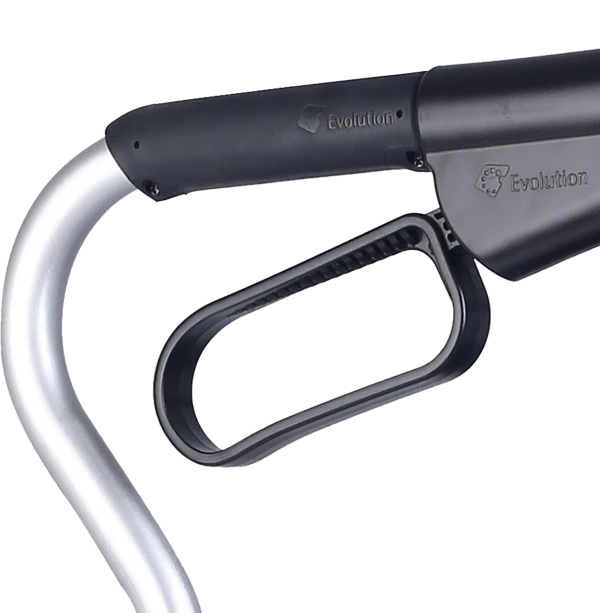
The OEM left bracket B04XPL restores back strap mounting for Xpresso Wide and Trillium models while metal construction, precise alignment and center-fold compatibility provides secure structural anchoring with right bracket B04XPR pairings.

    • Why OEM-Specification Back Strap Bracket?

      Back strap mounting brackets serve critical structural and geometric functions in rollator design that extend far beyond their apparent simplicity as small metal components. These brackets must withstand substantial forces generated when users lean backward against back straps during seated rest—a 200-lb user leaning back with 50-75% of body weight transferred through the back strap creates 100-150 lbs of tension force that concentrates at the two bracket mounting points, requiring robust bracket design and secure frame attachment to prevent bracket failure, frame damage, or catastrophic collapse during use. The bracket geometry—specifically the angle at which the bracket projects from the rear upright, the height position on the upright, and the spacing between left and right brackets—directly determines back strap tension characteristics, user comfort during seated rest, and critical clearances required for proper center-fold operation. Brackets positioned too high place the back strap above optimal spinal support location (mid-to-lower back), reducing effectiveness and user comfort; brackets positioned too low create interference with seat cushions or folding mechanisms. Brackets angled incorrectly alter back strap tension distribution, creating either excessive looseness (strap sags, providing inadequate support) or over-tensioning (overstresses both strap and bracket mounting points, accelerating wear and creating frame stress concentration). Perhaps most critically, bracket geometry affects center-fold function—as rollators fold, the rear uprights must move closer together, and any bracket protrusion into the folding path creates binding, prevents complete folding, or damages adjacent components through contact. Generic aftermarket brackets from non-OEM sources frequently use incorrect dimensions (different projection angles, mounting hole positions that don't align with frame holes, or overall sizes that interfere with folding), incompatible materials (steel instead of aluminum creating weight imbalance or galvanic corrosion when dissimilar metals contact), or inappropriate strength ratings (insufficient material thickness or inadequate heat treatment creating premature failure under loading). The B04XPL bracket, engineered specifically for Evolution Technologies' Xpresso Wide and Trillium rollator series, maintains exact factory specifications for mounting hole patterns (ensuring alignment with frame holes without drilling or modification), projection angles (preserving optimal back strap tension and spinal support positioning), material selection (compatible with frame materials preventing corrosion), and clearance dimensions (enabling smooth center-fold operation without binding or interference). The left/right specificity (B04XPL for left, B04XPR for right) recognizes that many rollator designs use asymmetric bracket configurations where left and right brackets differ slightly in geometry, mounting orientation, or features to accommodate frame asymmetries, folding mechanism components positioned on one side, or manufacturing considerations—attempting to use right brackets on left positions (or vice versa) creates improper fit, altered geometry, or folding interference even if brackets appear superficially similar.

      Key Features

      • OEM Part Specification B04XPL: Evolution Technologies factory-engineered left bracket with correct dimensions, materials, and mounting configuration for Xpresso Wide and Trillium models
      • Left-Side Specific Design: Engineered explicitly for left rear upright position with appropriate orientation, mounting holes, and geometric features (right bracket B04XPR required for right side)
      • Xpresso Wide & Trillium Compatibility: Designed for these specific rollator series with verified fit for frame geometry and folding mechanisms
      • Metal Construction: Durable metal alloy (typically aluminum or steel) provides structural strength to withstand 100-150 lb back strap tension forces during seated leaning
      • Factory Geometry Preservation: Exact projection angle, height position, and mounting orientation maintain optimal back strap tension and spinal support location
      • Center-Fold Clearance Design: Bracket dimensions and positioning enable smooth folding operation without binding, interference, or component contact
      • Precision Mounting Holes: Factory-positioned attachment points align exactly with frame mounting holes, eliminating need for drilling or modification
      • Corrosion-Resistant Finish: Powder-coat or similar protective finish prevents rust and material degradation from moisture exposure and outdoor use
      • Sold Individually: Single left bracket per package (enables single-side replacement when only one bracket damaged; pair with B04XPR when both sides require replacement)
      • Direct Strap Interface: Bracket design accommodates back strap attachment via bolts, pins, or other fastening systems per model specifications

      Benefits

      • Restored Back Support Function: New bracket enables secure back strap mounting, restoring safe comfortable seated rest capability
      • Maintained Frame Geometry: Proper bracket positioning preserves correct rear upright spacing and back strap tension essential for structural integrity and user safety
      • Preserved Folding Operation: OEM clearances ensure rollator continues folding smoothly without binding or interference at rear bracket locations
      • Cost-Effective Repair: $8-20 bracket replacement extends rollator service life 2-5 years versus $200-400 complete rollator replacement, achieving 95-97% cost savings
      • Side-Specific Replacement: Individual left bracket availability enables cost-effective single-side repair when only one bracket damaged (rather than forced bracket pair purchase)
      • Prevented Catastrophic Failure: Timely bracket replacement before complete failure prevents dangerous back strap detachment during seated leaning that could cause backward falls
      • Simplified Installation: Direct bolt-on mounting to existing frame holes returns rollators to service within 15-20 minutes using standard hand tools
      • Ensured Compatibility: OEM specification eliminates fit concerns, geometric compromises, or functional issues associated with generic aftermarket brackets
      • Material Compatibility: Factory-matched metal prevents galvanic corrosion issues that occur when dissimilar metals contact in moisture environments

      Clinical Applications

      âś“ Single-bracket replacement after isolated bracket failure from impact damage, stress cracks, or bent geometry
      âś“ Paired bracket replacement (B04XPL left + B04XPR right) when both brackets show wear or when replacing back straps
      âś“ Institutional rollator fleet maintenance replacing failed hardware during systematic preventive programs
      âś“ Medical equipment rental operations refurbishing returned equipment between patient assignments
      âś“ Rehabilitation facility equipment management extending capital equipment service life through component replacement
      âś“ Home health agency loaner equipment programs maintaining safety standards across inventory
      âś“ Senior living community maintenance serving resident-owned or facility-provided rollators
      âś“ Emergency repair situations where bracket failure prevents safe rollator use
      âś“ Preventive replacement programs for equipment showing early bracket stress (hairline cracks, bending, mounting looseness)
      âś“ Equipment donation programs preparing used rollators for redistribution to underserved populations

      Usage & Application

      Assessment and Left/Right Identification: Before ordering replacement brackets, thoroughly assess which bracket(s) require replacement and confirm correct left/right identification to ensure proper part selection. Inspect both left and right back strap mounting brackets on the rear uprights for damage: cracks (particularly around mounting holes or high-stress areas where bracket projects from frame), bending (bracket no longer projects at proper angle, visible when comparing to undamaged side), broken/stripped mounting holes (bracket loosens even when fasteners tightened fully), or corrosion (rust, pitting, or material degradation compromising structural integrity). To identify left versus right brackets, stand behind the rollator as if you were the user seated on it—the left bracket is on your left-hand side, right bracket on your right-hand side. Some brackets have "L" or "R" markings, but orientation is always determined from user's seated perspective. If only the left bracket is damaged while the right bracket remains serviceable, order only B04XPL for cost-effective single-side repair. If both brackets show damage or if replacing back strap simultaneously (common, as back strap and bracket wear often correlate), order both B04XPL (left) and B04XPR (right) for complete system replacement. Verify rollator model compatibility—this bracket fits Xpresso Wide and Trillium series; other Evolution models may require different bracket part numbers despite superficial similarity.

      Removal of Failed Left Bracket: Position rollator on stable work surface with adequate lighting and tool access. If a back strap is currently installed, remove it first to access the bracket mounting hardware (see back strap removal procedures in related documentation). Locate the fasteners securing the left bracket to the rear upright—typically 2-4 bolts or screws positioned around the bracket perimeter. Common fastener types include Phillips-head screws, hex-head bolts (8mm, 10mm, or similar), or occasionally Torx fasteners. Select the appropriate tool that fits precisely—using incorrect size tools can strip fastener heads, significantly complicating removal. Support the bracket with one hand while removing the final fastener to prevent it from dropping and potentially damaging the rollator or work surface. Remove fasteners systematically, loosening each several turns before completely removing any, which prevents bracket binding if slight misalignment exists. Once all fasteners are removed, carefully extract the failed bracket from the rear upright. Inspect the mounting area on the frame for damage—elongated mounting holes, cracks radiating from holes, or stripped threads indicate frame damage requiring professional assessment before bracket replacement. Clean the mounting surface thoroughly, removing dirt, rust, old thread-locking compound, or debris that could prevent proper new bracket seating.

      Installation of New OEM Left Bracket: Unpack the B04XPL bracket and inspect for shipping damage or manufacturing defects—bracket should be straight with no bends, cracks should be properly formed mounting holes, and protective finish should be intact. Compare the new bracket to the failed bracket to verify they match in size, mounting hole positions, and general geometry (accounting for any damage to the failed bracket). Position the new bracket on the left rear upright, aligning mounting holes in the bracket with corresponding holes in the frame structure. The bracket orientation matters—verify that the back strap attachment point (loop, slot, or mounting tab) faces rearward (toward where user's back will be when seated). Some brackets have obvious top/bottom orientation; if unclear, reference the failed bracket's orientation or the right bracket (mirror image). Insert fasteners through bracket mounting holes into frame holes, hand-threading each fastener several turns before tightening any fully—this ensures all holes align properly before creating binding tension. If fasteners don't thread easily, don't force them; remove and verify proper hole alignment and check for damaged frame threads. Once all fasteners are started, tighten them gradually in a cross pattern (similar to wheel lug nut tightening) rather than fully tightening one fastener before moving to the next. This cross-pattern tightening distributes clamping force evenly, preventing bracket distortion from uneven fastener tension. Tighten to firm snugness using appropriate torque—overtightening can strip threads or crack brackets/frames, while under-tightening allows movement under loading. For critical installations or if torque specifications are available, use a torque wrench to achieve proper tension. Consider applying thread-locking compound (medium strength, removable type like Loctite 243) to prevent fastener loosening from vibration during use, particularly for institutional equipment experiencing heavy use.

      Back Strap Reinstallation and System Verification: After securing the new left bracket, reinstall the back strap if it was removed during bracket replacement (see back strap installation procedures in related documentation). If replacing both left and right brackets simultaneously, install the right bracket B04XPR before reattaching back strap. If only the left bracket was replaced and the back strap remained attached to the right side during service, simply reconnect the strap to the new left bracket. Ensure proper back strap tension—the strap should be firm but not rigid, deflecting approximately 1-2 inches when pressed with moderate hand pressure at center. After back strap installation, conduct comprehensive functional testing. Test the folding mechanism by engaging fold release and bringing frame sides together—the rollator should fold smoothly without binding at the rear bracket locations. The new bracket shouldn't contact or interfere with other components (brake cables, seat, basket, opposite bracket) during folding. When fully folded, verify the bracket hasn't altered folded dimensions or created new contact points. Unfold the rollator and verify it locks in extended position. Have the intended user (or someone of similar weight) sit on the rollator with brakes engaged and lean backward against the back strap to load test the bracket installation. The bracket should support the loading without visible deflection, loosening, or concerning sounds (creaking, popping). Inspect bracket mounting after loading—if fasteners have loosened, remove and apply thread-locking compound. If bracket appears to deflect or shift, discontinue use and assess for improper installation or underlying frame damage.

      Paired Bracket Replacement Considerations: When replacing both left and right brackets simultaneously (common when both show wear or when performing comprehensive back support system refurbishment), order both B04XPL (left) and B04XPR (right). Install both new brackets before reattaching back strap to ensure symmetric geometry and equal mounting security. During paired replacement, measure the distance between left and right bracket attachment points after installation and compare to original specification or undamaged reference—discrepancy indicates improper installation, frame damage, or (rarely) incorrect parts. When both brackets are new, they should mirror each other perfectly (accounting for any intentional design asymmetry). Paired replacement provides opportunity to verify frame symmetry—if brackets don't align symmetrically, underlying frame bending or damage may be present requiring professional assessment. After paired bracket replacement, back strap tension should be easier to adjust properly since both mounting points are secure and correctly positioned, unlike single-side replacement where asymmetry between new and worn brackets can affect tensioning.

      Institutional Fleet Maintenance Integration: For clinics, hospitals, rental companies, and senior living communities maintaining multiple Xpresso Wide and Trillium rollators, integrate bracket inspection into systematic preventive maintenance schedules. Inspect brackets during routine equipment checks: monthly for high-volume rental fleets, quarterly for moderate-use institutional equipment, annually for low-use backup inventory. Train maintenance staff on bracket assessment criteria: visible cracks (particularly emanating from mounting holes), bending (bracket no longer perpendicular to upright or projection angle altered), looseness (bracket shifts when manipulated despite tight fasteners indicating frame damage), and corrosion (rust, pitting, or finish breakdown exposing bare metal). Implement proactive replacement policies—replace brackets showing any cracks regardless of size, replace bent brackets even if bend appears minor (bent brackets create altered back strap geometry affecting both comfort and safety), and replace corroded brackets before structural integrity compromises. Maintain inventory of replacement brackets for both left (B04XPL) and right (B04XPR) based on fleet composition—if your facility has significant Xpresso Wide and Trillium equipment, stock brackets in 5:1 ratio relative to equipment count (enabling 20% of fleet to receive bracket replacement without supply delays). Document all bracket replacements in equipment maintenance logs noting rollator serial number, replacement date, left/right/paired replacement, and condition of removed bracket—this tracking identifies equipment with recurring bracket problems suggesting underlying frame issues or unusual usage patterns requiring deeper assessment.

      Troubleshooting Installation and Compatibility Issues: If difficulties arise during bracket installation, systematically address potential causes rather than forcing installation that could damage components. If mounting holes don't align: verify correct part (B04XPL for left, B04XPR for right), confirm proper bracket orientation (back strap attachment point rearward, not forward), check for damaged or bent frame uprights shifting hole positions (compare to undamaged reference), and consider frame manufacturing variation (rare, but early production units sometimes differ from later models). If fasteners don't thread properly: verify using correct fastener type and size (don't substitute metric for imperial or vice versa unless specified), check for damaged frame threads (may require thread repair inserts or helicoils), ensure you're threading into correct holes (some frames have multiple hole sets for different purposes or adjustments), and clean holes thoroughly as packed debris can prevent threading. If bracket feels loose after installation despite tight fasteners: inspect frame for cracks or damage at mounting points allowing bracket movement, verify all specified fasteners are present (missing even one creates instability), check that bracket seats flush against frame (warped brackets or frame damage can prevent proper seating), and consider thread-locking compound application. If folding mechanism binds after bracket installation: verify bracket doesn't protrude into folding path (may indicate wrong part or improper orientation), check that new bracket matches geometry of original (improper part substitution), ensure back strap doesn't create interference (improper tension or routing), and inspect for accidental component contact during installation.

      Technical Specifications

      Part Identification
      Manufacturer Part Number: B04XPL
      Description: Left Back Strap Mounting Bracket for Xpresso Wide and Trillium Rollators
      OEM Status: Evolution Technologies factory-specification component
      Side Orientation: Left (for right side, order B04XPR separately)
      Brand: Evolution Technologies
      Category: Rollator structural mounting hardware

      Compatibility
      Product Lines:

      • Evolution Xpresso Wide Series
      • Evolution Trillium Rollator Series
        Compatibility Note: NOT compatible with standard Xpresso or Xpresso Lite models—those require different bracket specifications
        Frame Type: Rear upright mounting for center-folding rollators
        Verification: Confirm model designation before ordering

      Material and Construction
      Primary Material: Metal alloy (typically aluminum or steel)
      Material Properties: High strength-to-weight ratio, corrosion-resistant, appropriate yield strength for loading conditions
      Surface Finish: Powder-coat, anodizing, or similar protective coating
      Finish Color: Typically matches rollator frame (black, gray, silver common)
      Thickness: Appropriate for 100-150 lb tension loading (varies by design)

      Dimensional Specifications
      Size: Model-specific (Xpresso Wide and Trillium specifications)
      Projection: Distance bracket extends from rear upright (varies by design)
      Mounting Hole Spacing: Corresponds to frame hole pattern
      Back Strap Interface: Loop, slot, tab, or mounting point for strap attachment
      Clearance: Designed to avoid interference during center-fold operation

      Mounting Specifications
      Mounting Location: Left rear upright
      Mounting Points: Typically 2-4 fastener locations
      Fastener Type: Bolts or screws (typically Phillips-head, hex-head, or Torx)
      Fastener Size: Varies by model (commonly 8mm, 10mm, or similar)
      Hardware Included: May or may not include mounting hardware—confirm with supplier
      Installation Tools: Wrenches, screwdrivers, or socket set (size matches fasteners)
      Installation Time: Approximately 15-20 minutes per bracket

      Functional Specifications
      Load Capacity: Designed to support 100-150 lb back strap tension forces
      Structural Function: Anchors back strap to frame, maintains rear upright spacing
      Folding Integration: Geometry enables smooth center-fold without binding
      Back Strap Compatibility: Works with Evolution back straps for specified models

      Related Components (Sold Separately)
      Right Bracket: B04XPR (required for paired bracket replacement)
      Back Strap: Model-specific back strap for Xpresso Wide/Trillium (confirm part number)
      Fasteners: May need to be ordered separately if not included with bracket
      Back-Strap Pad: Optional cushion pad for additional comfort (model-specific part number)

      Service Life and Durability
      Expected Service Life: Typically 5-10 years with normal use (brackets generally outlast back straps)
      Primary Degradation Factors: Stress fatigue from repeated loading, impact damage, corrosion from moisture exposure
      Failure Modes: Cracking (typically around mounting holes), bending, mounting hole elongation/stripping, or complete fracture
      Maintenance: Visual inspection during routine equipment checks; replace if cracks, significant bending, or looseness detected

      Replacement Indicators
      Replace Bracket When:

      • Any visible cracks present (particularly around mounting holes)
      • Bending visible (bracket projection angle changed from original)
      • Mounting looseness despite tight fasteners (indicates hole damage)
      • Corrosion compromising structural integrity (significant rust, pitting)
      • Back strap detachment during use (immediate replacement required)
      • Frame contact during folding (indicates geometric alteration)
    • No reviews yet

      Add yours

    Testimonials from Google

    See all reviews

    Your cart — 0

    You cart is currently empty

    Login