Slideshow Items

  • Mobility Accessories
  • mobility/mobility-accessories
  • Mobility
  • mobility
EVO - Evolution

  |  

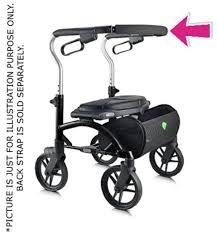
Evolution Back Strap for Xpresso Lite (not including Pad)

C$48.00
In stock online
In store: Check availability

Available in store

SKU: B03XR

The OEM back strap with B03XR specification restores seated support and center-fold geometry for Xpresso Lite models while durable construction, bracket compatibility and optional pad B03XPP provide complete back support system restoration.

    • Why OEM-Specification Back Strap?

      The back strap serves multiple critical functions in center-folding rollators that extend far beyond the obvious user comfort provided by back support during seated rest. In center-fold designs like the Xpresso Lite, the back strap functions as a structural cross-member that maintains proper spacing between the left and right rear frame uprights during both use and folding operations—without this tension member, the rear uprights would spread apart under loading, altering frame geometry and potentially causing binding, misalignment, or complete folding mechanism failure. When users sit on rollators and lean backward against the back strap, significant forces transmit through the strap into the frame structure—body weight plus additional loading from the leaning motion can create 150-300 lbs of tension in the back strap, requiring robust material construction and secure mounting to prevent failure during use. The back strap also contributes to user posture and comfort during rest breaks: without back support, users must either maintain upright trunk position through active muscle engagement (fatiguing during prolonged rest) or lean forward in hunched posture (creating back and neck strain), while the back strap enables relaxed upright sitting with trunk support that reduces fatigue and enables longer effective rest periods. Over time, back straps experience degradation from multiple factors: ultraviolet light exposure during outdoor use breaks down synthetic materials, repeated tensioning and releasing during sitting cycles causes material fatigue, perspiration and body oils absorbed into strap material promote bacterial growth and material breakdown, and sharp objects or rough surfaces can cause cuts, abrasions, or punctures that compromise structural integrity. Stretched back straps lose tension, allowing excessive backward lean that shifts the rollator's center of gravity rearward and creates tipping hazards, while torn straps create complete loss of back support that can cause users to fall backward unexpectedly if they lean back expecting support. Generic aftermarket back straps from non-OEM sources often use incorrect length (preventing proper tension or over-stressing mounting points), incompatible mounting hardware (requiring drilling or modification that damages frame structure), or inappropriate materials (lacking required tensile strength or UV resistance). The Xpresso Lite-specific B03XR back strap maintains exact length specifications established during original engineering to provide optimal tension at proper installation, uses compatible mounting system that interfaces with factory frame mounting points (or replacement brackets B04XPL/B04XPR if original brackets are damaged), and employs materials with appropriate strength, flexibility, and environmental resistance for rollator use environments. The integration with optional back-strap pad B03XPP recognizes that some users require additional cushioning beyond the basic strap—users with sensitive skin, spinal conditions, or who spend extended periods sitting benefit from the cushioned interface that distributes pressure across larger surface area while the underlying strap maintains structural function.

      Key Features

      • OEM Part Specification B03XR: Evolution Technologies factory-engineered strap with correct length, material properties, and mounting configuration for Xpresso Lite models
      • Xpresso Lite-Specific Compatibility: Designed exclusively for Xpresso Lite series (Mini, Regular, Tall variants—verify model/serial for exact fit confirmation)
      • Structural Cross-Member Function: Maintains proper rear upright spacing essential for center-fold geometry, preventing frame misalignment and folding mechanism binding
      • Durable Material Construction: Heavy-duty synthetic strap material withstands 150-300 lb tensioning forces during seated leaning while resisting UV degradation and moisture damage
      • Factory-Matched Length: Precise dimension ensures optimal tension when properly installed, preventing under-tension (excessive backward lean) or over-tension (frame stress)
      • Compatible Mounting System: Interfaces with original frame mounting points or replacement brackets (B04XPL left, B04XPR right) for secure attachment without modification
      • Cushion Pad Integration: Works seamlessly with optional back-strap pad B03XPP for users requiring additional cushioning and pressure distribution
      • Weather-Resistant Materials: UV-resistant and moisture-resistant construction maintains integrity through outdoor use and varied storage conditions
      • Maintains Folding Function: Proper installation preserves smooth center-fold operation without binding, interference, or altered folded dimensions
      • Cost-Effective Repair: $15-35 back strap replacement extends rollator service life 2-4 years versus $200-400 complete rollator replacement

      Benefits

      • Restored Back Support: New strap provides proper tension for comfortable seated rest, eliminating stretched-strap excessive backward lean or torn-strap complete support loss
      • Maintained Frame Geometry: Proper rear upright spacing preserves center-fold mechanism function, preventing binding and ensuring smooth folding operation
      • Enhanced User Confidence: Reliable back support encourages users to utilize seat for necessary rest breaks rather than avoiding sitting due to concerns about support failure
      • Fall Prevention: Proper tension prevents excessive backward lean that shifts center of gravity rearward creating tipping hazards
      • Extended Equipment Life: Component replacement prevents premature rollator disposal, achieving 90-95% cost savings versus replacement
      • Simplified Installation: Basic mounting procedure returns rollators to service within 20-30 minutes using standard hand tools
      • Preserved Manufacturer Specifications: OEM part maintains original equipment safety margins, structural requirements, and functional characteristics
      • Compatibility Assurance: Factory-specified design eliminates fit concerns, mounting complications, or functional compromises associated with generic parts
      • Optional Comfort Enhancement: Integration with back-strap pad B03XPP enables customized comfort level based on individual user needs
      • Environmental Sustainability: Component replacement reduces aluminum and plastic waste while conserving manufacturing resources

      Clinical Applications

      ✓ Long-term Xpresso Lite users experiencing back strap degradation after years of daily use
      ✓ Institutional rollator fleet maintenance replacing failed components during systematic preventive programs
      ✓ Medical equipment rental operations refurbishing returned equipment between patient assignments
      ✓ Home health agency loaner equipment programs maintaining safety standards across inventory
      ✓ Rehabilitation facility equipment management extending capital equipment service life
      ✓ Senior living community maintenance serving resident-owned or facility-provided rollators
      ✓ Individual users requiring back support restoration after strap damage from sharp objects or wear
      ✓ Outdoor users experiencing accelerated UV degradation requiring earlier-than-typical replacement
      ✓ Heavy users approaching weight capacity experiencing accelerated material fatigue
      ✓ Emergency repair situations where users depend on rollators for essential mobility
      ✓ Preventive replacement programs for equipment showing early stress signs (fraying, stretching)
      ✓ Equipment donation programs preparing used rollators for redistribution

      Usage & Application

      Assessment and Compatibility Verification: Before ordering replacement back straps, thoroughly assess the rollator to confirm the back strap is the component requiring replacement and that related components (mounting brackets, frame structure) remain serviceable. Inspect the existing back strap for visible damage: fraying (individual fibers separating from strap edges or surface), stretching (strap noticeably longer than original, creating excessive slack even when tensioned), tears or cuts (material separation compromising structural integrity), or material degradation (surface breaking down, becoming brittle, showing significant discoloration). Verify the mounting brackets on both left and right rear uprights remain structurally sound—cracked, bent, or loose brackets require replacement with B04XPL (left bracket) and B04XPR (right bracket) before installing new back strap, as damaged brackets cannot properly secure strap tension. Locate the rollator's model identification on frame label or stampings—Xpresso Lite models should clearly indicate "Xpresso Lite" plus size designation (Mini, Regular, or Tall). Record serial number if visible, as Evolution Technologies or authorized dealers can confirm exact specifications for your production batch. If model information is unclear, measure the distance between rear upright mounting points and contact Evolution customer service with this dimension plus photographs of the rollator to verify B03XR compatibility.

      Removal of Failed Back Strap: Position the rollator on stable work surface with adequate lighting and tool access. Locate the back strap attachment points on both left and right rear uprights—attachment methods vary by production batch but typically include bolts through strap loops into bracket mounting holes, pins through strap grommets retained by clips or cotter pins, or strap wrapped around brackets and secured with hook-and-loop or buckles. If bolts secure the strap, use appropriate wrench or socket (typically 8mm, 10mm, or similar) to remove fasteners—support the strap as fasteners release to prevent sudden dropping. If pins retain the strap, remove retaining clips or cotter pins (needle-nose pliers helpful), then slide pins out carefully. If hook-and-loop or buckles secure the strap, simply unfasten. Once both attachment points release, remove the failed strap from the rollator. If a cushion pad was installed over the strap, remove it first and set aside for cleaning or disposal if worn. After strap removal, inspect the mounting brackets on both uprights—check for cracks (particularly around mounting holes), bending (bracket no longer perpendicular to upright), or loose mounting (bracket shifts when manipulated). Clean mounting areas thoroughly, removing dirt, sweat residue, or material fibers from the old strap that could interfere with new strap installation.

      Bracket Replacement if Necessary: If inspection reveals damaged mounting brackets, replace them before installing the new back strap to ensure secure attachment and proper tension capability. Order replacement brackets: B04XPL for left side, B04XPR for right side (sides determined when standing behind the rollator looking forward). Remove damaged brackets by loosening fasteners securing them to frame uprights—typically 2-4 bolts per bracket. Note the bracket orientation carefully before removal, as correct reinstallation angle affects back strap tension and position. Install new brackets in identical orientation to original mounting, ensuring bracket surfaces that will contact the back strap face rearward (toward user's back when seated). Tighten bracket mounting fasteners securely—loose brackets allow movement under back strap tension, creating instability and accelerating both bracket and strap wear. After bracket installation, verify both brackets align properly—misaligned brackets create uneven strap tension or cause the strap to pull to one side. Measure distance from each bracket to the ground—both should be equal height; significant difference indicates bracket or frame misalignment requiring professional assessment before proceeding.

      Installation of New OEM Back Strap: Unpack the B03XR back strap and inspect for shipping damage or manufacturing defects—strap should be straight with no twists, tears, or material irregularities. Identify strap orientation if it has directional features (some straps have wider or reinforced portions intended for specific positioning). Position one end of the strap at the left rear upright bracket mounting point, threading through bracket holes, loops, or slots per the bracket design. Secure this end loosely—if bolts are used, thread them in several turns but don't tighten fully; if pins are used, insert pins but don't install retaining clips yet. This loose initial attachment enables tensioning during final installation. Route the strap across the rear of the rollator, maintaining consistent height position, to the right rear upright bracket. Thread the strap through the right bracket mounting point similarly to the left side. Now adjust strap tension: pull the strap firmly through the right bracket mounting point, removing all slack and creating moderate tension. The proper tension feels firm but not rigid—the strap should deflect 1-2 inches when pressed with moderate hand pressure at center. Excessive tension overstresses brackets and frame; insufficient tension allows too much backward lean. While maintaining this tension, secure the right side attachment point—tighten bolts fully or insert pins and install retaining clips. Then return to the left side and complete its fastening with strap tension maintained. After both sides are secured, press on the strap center to verify tension—it should support hand pressure without excessive deflection but retain slight give indicating the strap material isn't overstressed.

      Optional Back-Strap Pad Installation: If users require additional cushioning for comfort or pressure relief, order and install the back-strap pad Part B03XPP. This cushioned pad attaches over the installed back strap, providing soft interface between user's back and the structural strap. Back-strap pads typically attach via hook-and-loop fasteners, elastic straps that wrap around the back strap, or compression fit that slides over the strap. To install: position the pad centrally over the back strap at the height where user's back will contact when seated (typically lower-to-mid back level). Wrap attachment mechanism around the back strap and secure—hook-and-loop should engage firmly, elastic straps should be snug without being overly tight, compression-fit designs should slide on with moderate effort but stay in place securely. After pad installation, test by pressing on the pad surface—it should feel cushioned and remain securely positioned without sliding. The pad does not contribute to structural support (the underlying strap provides all structural function) but significantly enhances user comfort particularly for prolonged sitting periods.

      Post-Installation Functional Verification: After back strap and optional pad installation, conduct comprehensive functional testing before returning rollator to service. Test the folding mechanism by engaging fold release and bringing frame sides together—the rollator should fold smoothly without binding at the rear uprights where the new back strap spans. The back strap should flex appropriately during folding without creating excessive resistance or preventing complete fold. Verify the strap doesn't contact or interfere with other components (brake cables, seat cushion, basket) during folding. When fully folded, inspect whether the back strap maintains appropriate tension or if folding has loosened attachment points. Unfold the rollator and verify it locks in extended position. Have the intended user (or someone of similar weight) sit on the rollator with brakes engaged and lean back against the back strap to test support function. The strap should provide firm support without stretching excessively, and users should feel confident leaning backward without concerns about strap failure. Check rear upright spacing after loading—both uprights should remain parallel without spreading apart under load, confirming the back strap properly maintains frame geometry. If any functional issues arise, recheck strap tension, bracket security, and installation orientation.

      Institutional Maintenance Integration: For clinics, hospitals, rental companies, and senior living communities maintaining multiple Xpresso Lite rollators, integrate back strap inspection and replacement into systematic preventive maintenance schedules. Inspect back straps during routine equipment checks: monthly for high-volume rental fleets, quarterly for moderate-use institutional equipment, annually for low-use backup inventory. Train maintenance staff on assessment criteria: surface fraying with visible fiber separation, material stretching indicated by excessive slack even when tensioned, discoloration or surface breakdown from UV exposure, cuts or tears of any size, and loss of tension indicated by excessive backward lean during test loading. Implement proactive replacement policies—replace straps showing significant fraying before complete failure, replace stretched straps that no longer provide adequate tension (more than 3-4 inches of deflection under moderate pressure), and replace any strap with cuts or tears regardless of size. Maintain inventory of B03XR replacement straps sized for your Xpresso Lite fleet composition, plus spare bracket sets (B04XPL/B04XPR) for approximately 10% of fleet as brackets may fail during service life. Document all back strap replacements in equipment maintenance logs noting rollator serial number, replacement date, condition of removed strap, and whether bracket replacement was necessary—this tracking identifies equipment with recurring problems suggesting underlying frame issues or unusual usage patterns.

      Material Care and Service Life Extension: While back straps eventually require replacement, users can extend service life through proper care and use practices. After use in wet conditions (rain, snow), wipe the back strap with dry cloth and allow complete drying before storage—moisture retention accelerates material breakdown. Store rollators out of direct sunlight when possible, as UV exposure is the primary accelerator of synthetic strap degradation (service life can decrease 30-50% with continuous outdoor storage versus climate-controlled indoor storage). Clean the back strap periodically using mild soap and water with soft cloth—avoid harsh chemicals, bleach, or abrasive cleaners that attack synthetic materials. Inspect the strap monthly for early signs of wear enabling proactive replacement before failure—small fraying can be monitored but rapid progression indicates replacement needed soon. Avoid overloading the rollator beyond rated capacity, as excessive weight accelerates strap fatigue. For users who must leave rollators outdoors, consider fabric covers that shield the back strap from direct sun exposure. Expected service life ranges from 2-5 years with daily use, though harsh environments or heavy use can reduce this to 1-2 years while protected indoor use can extend beyond 5 years.

      Technical Specifications

      Part Identification
      Manufacturer Part Number: B03XR
      Description: Replacement Back Strap for Xpresso Lite Rollator
      OEM Status: Evolution Technologies factory-specification component
      Brand: Evolution Technologies
      Category: Rollator structural replacement component

      Compatibility
      Product Line: Evolution Xpresso Lite Rollator Series
      Compatible Models:

      • Xpresso Lite Mini (compact/petite size)
      • Xpresso Lite Regular (standard adult size)
      • Xpresso Lite Tall (extended height size)
        Compatibility Verification: Model and serial number matching recommended for exact fit confirmation
        Frame Type: Center-folding rollator frames (Xpresso Lite-specific geometry)

      Material and Construction
      Primary Material: Heavy-duty synthetic webbing or composite strap material
      Material Properties: High tensile strength (supports 150-300 lb loading), UV-resistant formulation, moisture-resistant, flexibility for folding operations
      Width: Typically 2-3 inches (provides comfortable back contact surface)
      Thickness: Appropriate for strength requirements while maintaining flexibility
      Color: Typically black or gray (may vary by production batch)
      Surface: Textured or smooth depending on material formulation

      Dimensional Specifications
      Length: Model-specific (Mini/Regular/Tall have different lengths)
      Mounting Point Spacing: Corresponds to rear upright spacing on each Xpresso Lite size
      Adjustment: Typically fixed length (tension set during installation) or may include minor adjustment mechanism

      Mounting Specifications
      Attachment Method: Varies by production batch—bolts through loops, pins through grommets, or wrap-around fastening
      Mounting Hardware: May be included with strap or may reuse existing hardware
      Compatible Brackets: Works with original brackets or replacement brackets B04XPL (left) and B04XPR (right)
      Installation Tools: Basic hand tools (wrenches, pliers) typically sufficient
      Installation Time: Approximately 20-30 minutes for experienced user

      Functional Specifications
      Load Capacity: Designed to support 150-300 lb tensioning forces during seated leaning
      Tension Adjustment: Proper installation creates moderate tension with 1-2 inch deflection under hand pressure
      Structural Function: Maintains rear upright spacing preventing frame spreading under load
      Folding Integration: Flexes appropriately during center-fold operation without binding or creating excessive resistance

      Related Components (Sold Separately)
      Compatible Cushion Pad: B03XPP (Xpresso Lite back-strap pad for additional comfort)
      Left Mounting Bracket: B04XPL (replacement if original bracket damaged)
      Right Mounting Bracket: B04XPR (replacement if original bracket damaged)
      Installation Note: Brackets NOT included with back strap; order separately if needed

      Service Life and Durability
      Expected Service Life: 2-5 years with daily use (varies by environment and usage intensity)
      Primary Degradation Factors: UV exposure, mechanical fatigue from repeated loading, moisture exposure, abrasion
      Failure Modes: Fraying, stretching (loss of tension), tearing, or material embrittlement
      Maintenance: Visual inspection monthly; replace if significant fraying, stretching, tears, or loss of tension

      Replacement Indicators
      Replace Back Strap When:

      • Fraying visible with fiber separation at edges or surface
      • Stretching creates excessive slack (more than 3-4 inch deflection under moderate pressure)
      • Any cuts or tears present regardless of size
      • Material shows significant discoloration, surface breakdown, or embrittlement
      • Loss of tension allows excessive backward lean during seated use
    • No reviews yet

      Add yours

    Testimonials from Google

    See all reviews

    Your cart — 0

    You cart is currently empty

    Login